Say what you want to happen, in plain English, and the Familiar plans and builds a Spell (a saved, reusable automation) for you. You approve the plan before anything is created, and you approve again before anything risky runs. No coding, no security jargon required.
The Familiar (your AI operator companion) can build a whole Spell (a saved, runnable response automation) from a sentence. You state the outcome you want in plain English, the Familiar looks at what you have and lays out a full build plan, and nothing is created until you approve it. This is building without authoring: you describe intent, the Familiar plans and assembles, and you approve at the checkpoints.
State an outcome
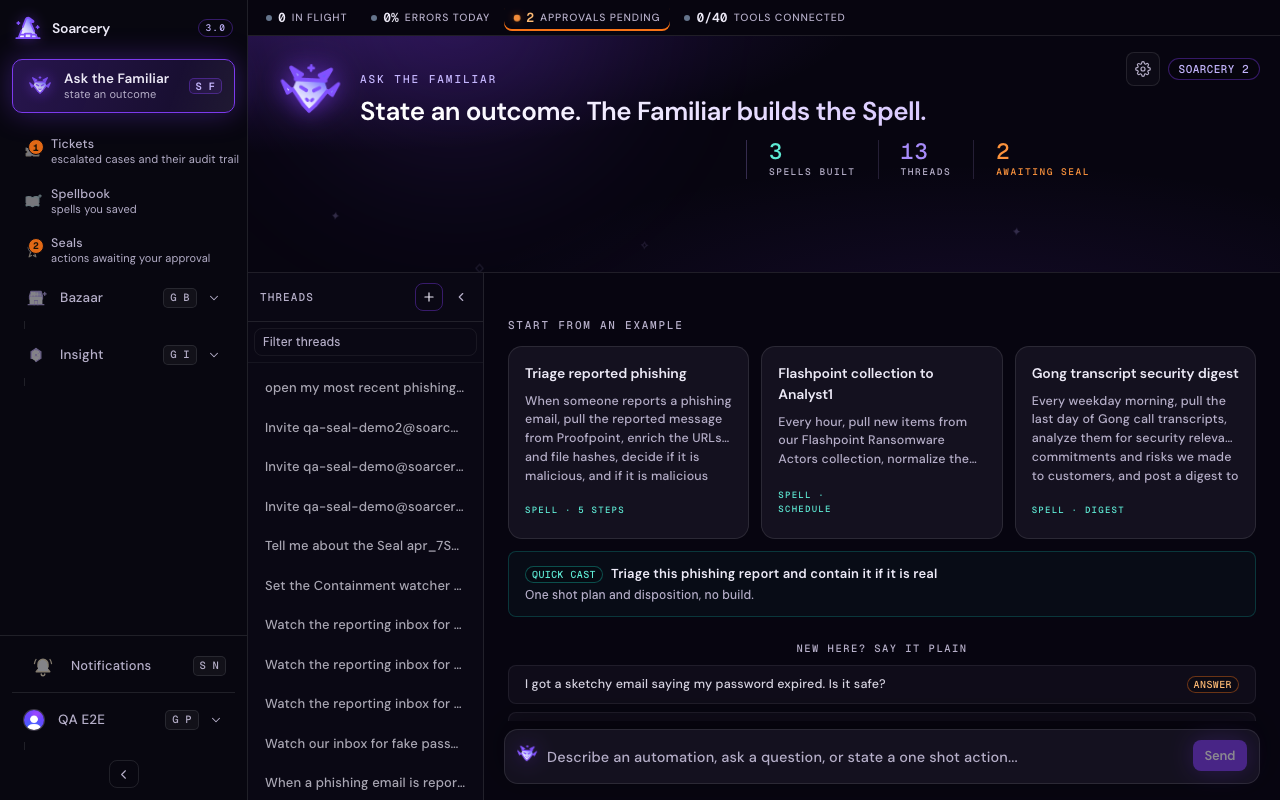
Describe what should happen from start to finish: what starts the Spell, what to look up, how to decide, and what to do in each case. A good outcome names the systems and the decision, for example pulling a reported message, enriching its indicators, deciding if it is malicious, and containing it if it is. There is no mode to pick: the composer infers from your phrasing whether you are building an automation, asking a question, or firing a one shot action, and shows its call on a small chip beside the send control. Click the chip to change the call before sending. Asking for help counts as a question wherever it sits in the sentence: describe what happened and ask what to do, and the Familiar answers instead of building.
No vocabulary required
You do not need to know security terms, or Soarcery's, to use the Familiar. The product's named concepts (Seal, Spell, cast, and the rest) carry their plain meaning with them: the first time one appears its definition is shown inline, once, and after that hovering or tapping the dotted word brings the definition back. Plans are written the same way: steps say what they do in plain English, and acronyms are expanded the first time they are used. When a build needs a schedule, common choices are offered as one click presets and whatever schedule is set is narrated back in words, so nobody has to read a cron expression to know when something runs.
The plan comes first
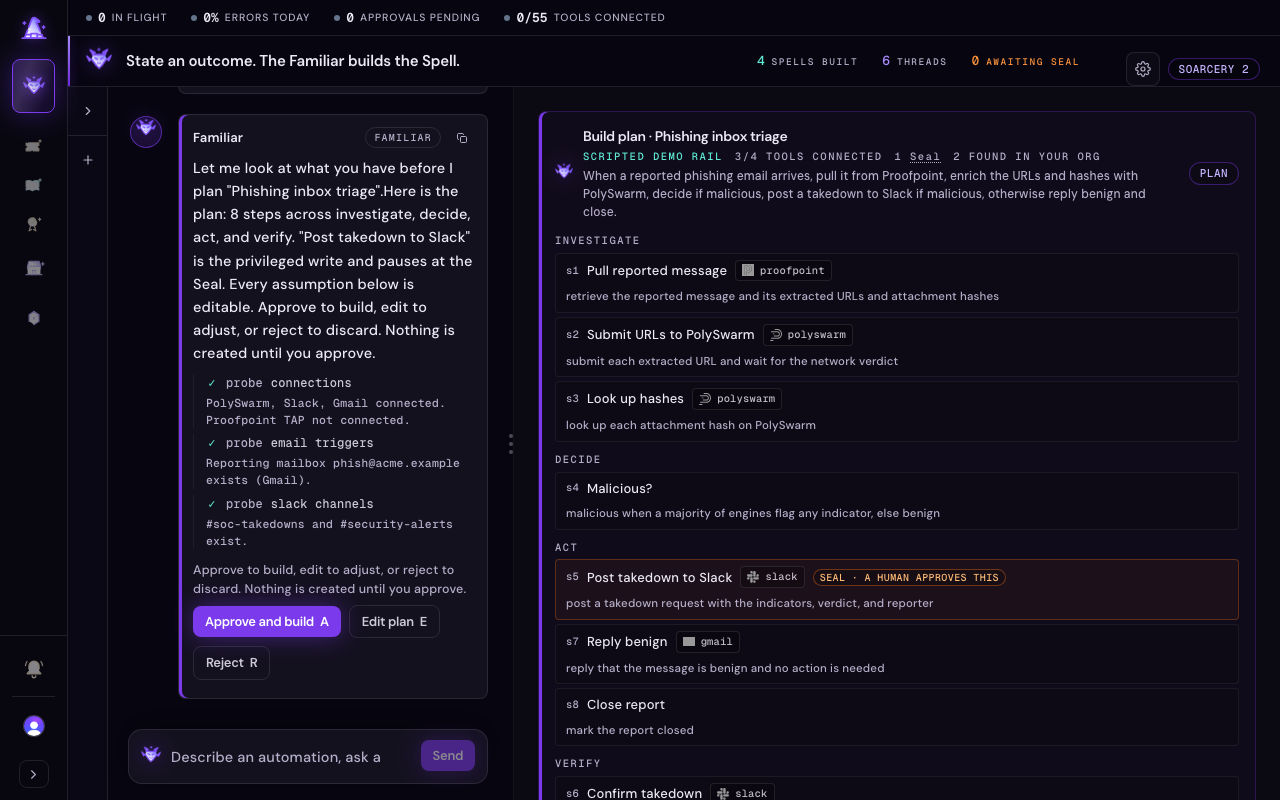
The Familiar checks what you have, then shows you a plan: the steps, the tools each one needs, and every assumption it made. Nothing is built until you approve it.
Before asking you anything, the Familiar probes your org: which tools are Connected, what mailboxes and channels exist, what a named collection actually contains. Every check it runs is shown as a work line in the conversation. Then it presents the plan: the steps it intends to build, the tools each one needs with their Connected state, and every assumption it made with where it came from (something you said, something it found, or a sensible default). You approve the plan, edit any assumption, or reject it, from the buttons in the conversation or the A, E, and R keys while the plan is paused. Edit opens the assumptions right on the plan to change one before you approve. Reject and nothing exists; the draft is only created when you approve.
Watching the build, and the wall
After you approve, the Familiar assembles the Spell in front of you: each step, each binding check, each verification appears as it happens. It does everything it can on its own. The one thing it will never do is enter credentials: when a step needs a tool that is not Connected, the failed check is shown and a connect form opens right in the conversation, with masked fields, a help link on each one, and a note that what you type goes straight to the secure vault, never through the Familiar. Ask about any field and the Familiar explains it. The classic connect flow on the Tools page is unchanged if you prefer it. Connect the tool and the build finishes where it left off. A tool that stays unconnected is flagged for attention, never treated as an error: the Spell still saves, and you can connect the tool later. The whole assembly runs as a background job with its progress shown as it goes, so a big build never times out the way a single long request once did, and if a step fails the Familiar says so and offers to try that step again in place.
Work the canvas by clicking
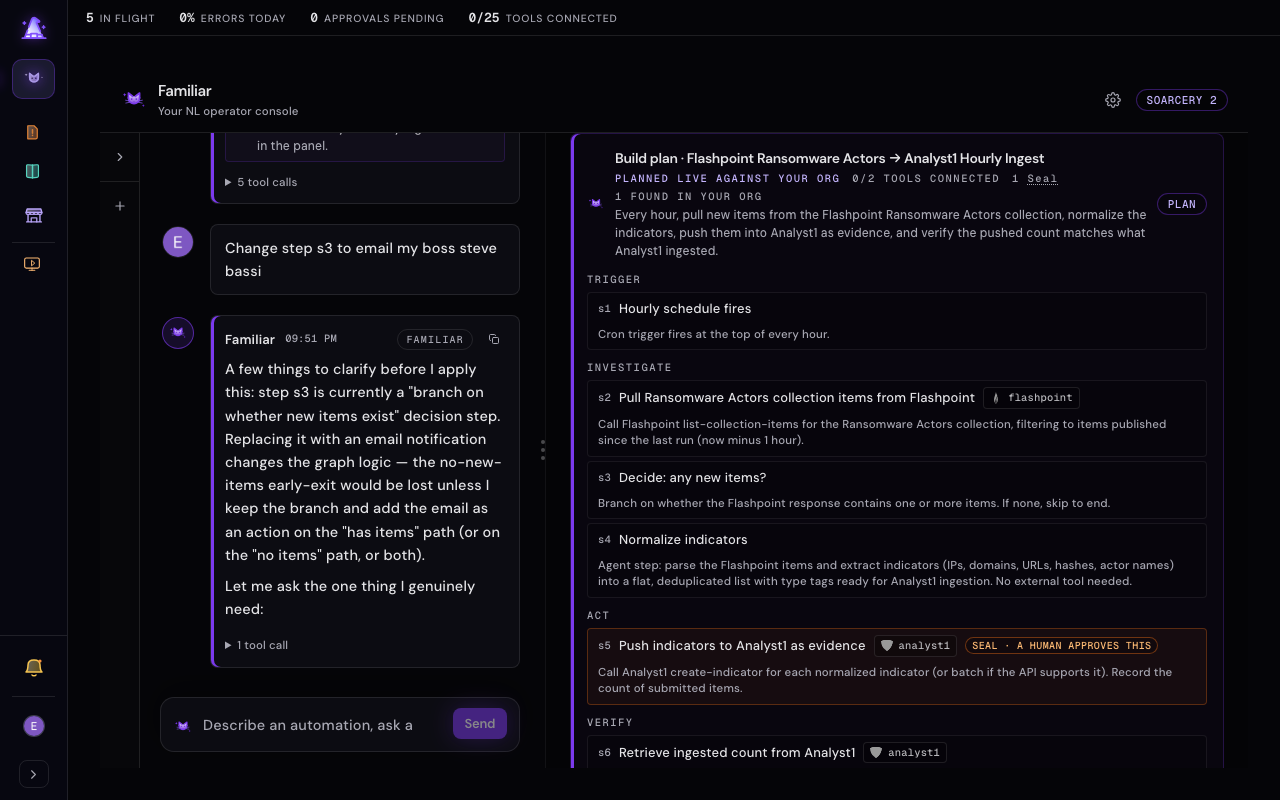
The assembling Spell on the right is where you work, not just a picture of it. Click a step and the Familiar makes the change for you, always confirming first. A click can never break the Spell.
Click a step and the Familiar tells you what it does and offers what to do next. Hovering a step brings up controls to edit it or remove it, and a plus between steps adds a new one right there; on a touch screen the first tap on a step reveals those controls and a second tap asks the Familiar about it, so the canvas works the same with or without a mouse. Every gesture is a request to the Familiar, never a direct change: it confirms what you meant, then makes the edit in the conversation, so a stray click can never alter the Spell. Anything that removes a step asks you to confirm first, in plain words, before it happens. When a piece of work finishes the Familiar proposes the next move as buttons in the chat, so you are guided from a plan to a running Spell without leaving the conversation.
The whole lifecycle, without leaving the conversation
Build, test, and approve a Spell all in the console. When a build finishes, the Familiar offers the next steps as buttons: review it, test it, approve it, or connect a missing tool.
A finished build does not hand you off anywhere. The Familiar proposes what comes next as buttons in the chat, and each one keeps you in the conversation. Ask to test the Spell and it runs through the safety gate: the reads run and record, any privileged write pauses at a Seal (the human approval checkpoint), and each step's outcome lights up on the canvas as it happens, so you watch the play unfold on the same picture you built. You can also ask for a dry run first, which shows what each step would do and changes nothing. When you are ready, ask to approve it and the Familiar promotes it to live from the chat, after checking it is complete and asking you to confirm. Nothing goes live on its own.
You can open a Spell you already saved and edit it here too: ask to edit it by name and it opens on the canvas, where you change steps by talking to the Familiar just like a fresh build. Editing a live Spell is treated with care: the Familiar re-checks that your change keeps it runnable and asks you to confirm before saving to a Spell that is already running in production, so a live automation is never changed by accident.
Quick cast for a one shot answer
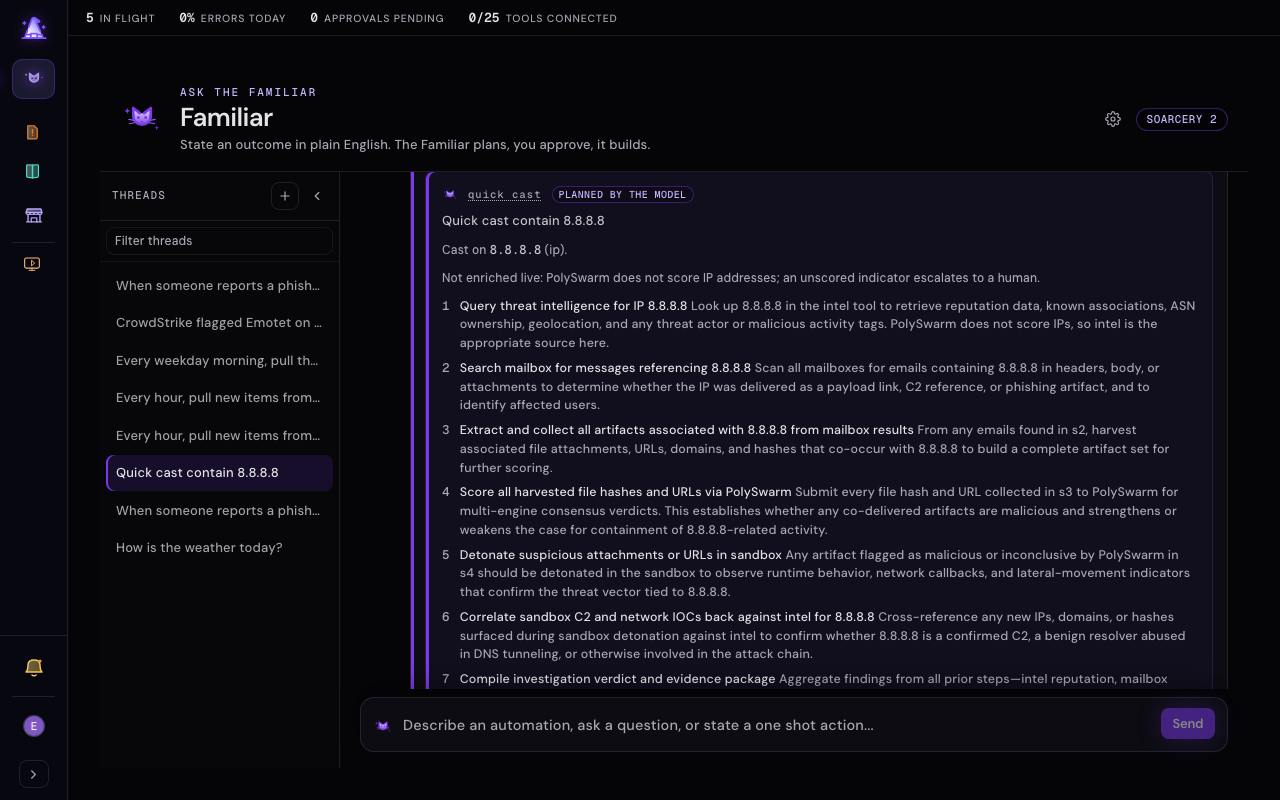
Not every ask needs a saved Spell. State a single action, like blocking an address or triaging one report, and the composer infers a quick cast: one plan and disposition back, with no Spell to keep. Quick cast triages the indicator in your sentence (an IP, URL, domain, or file hash, any digest from MD5 through SHA-512, recognized on sight) and enriches it live. The gate, not the model, owns what happens next from the verdict spread: an indicator with nothing scored yet gathers more evidence first (a read-only step, never a write), a contested or partly malicious spread escalates to a human, and only a clean benign result with no dissenting engines closes. A split verdict is never buried as benign. It runs the same proven path as a Cast (a single agent run through the safety gate): reads are recorded, and any privileged write pauses at a Seal (the human approval checkpoint) before it happens. Casts live in the thread like every other turn, so one you want to keep is not lost: choose to build it into a Spell and the cast's outcome carries straight into a plan-first build.
Saving and resuming a draft
A build saves as you go, so an incomplete Spell is never lost. Come back to the thread later and keep working right there: the canvas on the right is interactive, so you shape the draft by talking to the Familiar without leaving the conversation. The advanced Spell editor is still there for hand editing when you want it, and you can jump from it back into the Familiar. The saved draft is the source of truth: however you left it, that is where you resume. See Spells for how a finished Spell reads and runs.
When a turn does not go through
If a turn fails partway, the Familiar tells you in plain language and offers to try again in place. A retry replays the same request, so you never lose your wording, and a failed turn leaves the thread clean for the next one. If you open a link to a conversation that no longer exists, the Familiar says so and returns you to a fresh start rather than stranding you on a dead page. Opening a new conversation and never typing costs nothing: the thread is created only when you send your first message, so the list stays free of empty rows.
The scripted rail (demo and QA organizations)
By default the Familiar plans every build live against your organization, and the plan header says so. Demo and QA organizations carry one extra presenter control: the Scripted rail switch in the Demo / QA group of the navigation. Turned on, the three canonical walkthrough outcomes run a deterministic script instead of the live model, and their plans wear a scripted demo rail chip so nobody mistakes a rehearsal for the real thing. Everything else stays live, and the switch is not available outside demo and QA organizations.