The Bazaar is the catalog of Scrolls: prebuilt spells other people built, refined, and shared. Adopt one and it copies into a draft you can edit and cast. Start from something proven instead of a blank page.
The Bazaar (the marketplace) is where you get spells other people built. Every entry is a Scroll: a ready-made spell the security community has already refined. Adopting one copies it into your Spellbook (your list of spells) as a draft that is fully yours to edit, so you inherit the shape of a procedure that has worked elsewhere while keeping every word changeable. Tools now live on their own surface in the navigation; the Bazaar is purely about finding and adopting content.
Find the right Scroll
Search by what you are trying to automate: a phishing report, a suspicious URL, an offboarding. The search looks across a Scroll's name, description, category, and the tools it references. The facet rail alongside the results narrows the catalog by readiness (ready now, or still needs a key), by category, by the tools a Scroll uses, and by the source it was adapted from. Facets combine the way you would expect: pick a category and a tool and you see only Scrolls that match both, while picking two values inside the same group widens that group rather than narrowing it. Live counts on every facet show how many Scrolls match before you commit, and the results switch between a card grid and compact rows, whichever reads better for you.
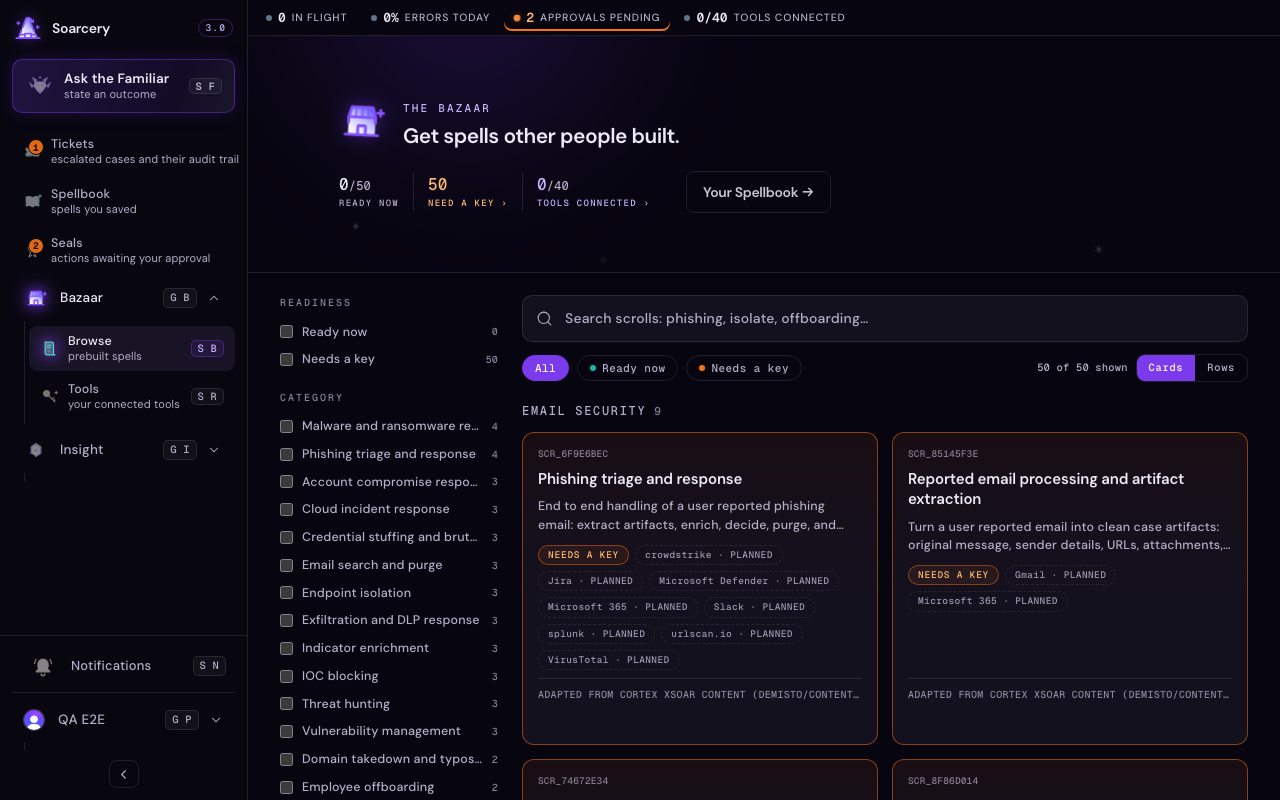
Read a card before you adopt
Each card tells you what it would take to run that Scroll in your environment. A readiness chip says whether it is ready now (every tool it references is connected) or still needs a key (at least one is not). The tool chips name the services the steps act through; a chip drawn with a dashed border marks a tool your organization has not connected yet, so the gap is visible before you commit to the procedure. A dashed chip is not a dead end: adopt the Scroll anyway and swap in an equivalent tool you do run, or connect the missing one. See tool statuses for what the catalog statuses mean. Scrolls adapted from open-source response content also carry a credit line naming the original source and its license. The card is only the summary: open a Scroll and you see its full shape before you commit, the steps it runs in order and where the procedure came from. Adopting works from either place, straight from the list when a Scroll is ready, or from the opened view once you have read the whole thing.
Adopt a Scroll
Every card carries one action: use the Scroll. Adopting clones it into your Spellbook as a draft that is yours to edit: rename it, trim steps, tighten conditions, swap tools for the ones you actually run. The Bazaar copy stays untouched for the next person; adopting is a copy, never a checkout. Connect any tools its chips reference and the spell is ready to deploy; see Spells for how a finished spell reads and runs.
What the provenance line means
Many Scrolls are adapted from open-source response content published under permissive licenses. The provenance line on a Scroll names the original source and its license, and the full license texts ship with the product in THIRD_PARTY_NOTICES.md. Soarcery rewrites each procedure into its own plain-English format, so what you get is the community's hard-won response logic without the flowchart it used to live in. When you adopt a Scroll, the provenance travels with your copy: the trail of where a procedure came from survives the clone.
Connect your Tools
Tools (the connected services your spells act through) have their own surface in the navigation. The Bazaar still cares about them, because a Scroll you adopt is only as ready as the tools its steps reference: the readiness chips, the dashed chips, and the tools-connected count in the header all read from the same connection state. When a Scroll needs a key, connecting the tool is the fix: see Connect your tools for health checks, scoped credentials, and the bring-your-own path through MCP.