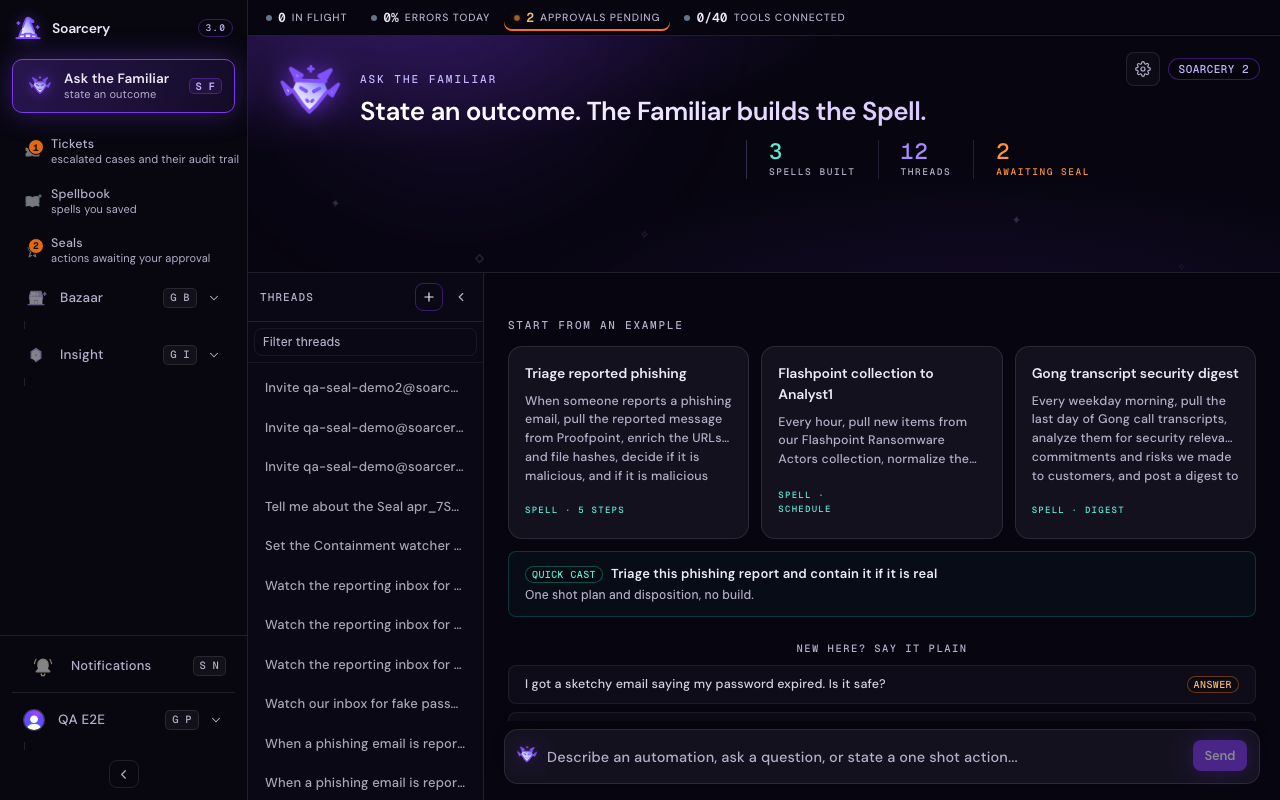
This is the menu of what you can ask the Familiar to do. The Familiar is the AI helper you talk to in plain English: you say what you want, it does the work, and it always asks you before anything risky. Each entry below is one thing to say, what happens when you say it, and what it needs back from you.
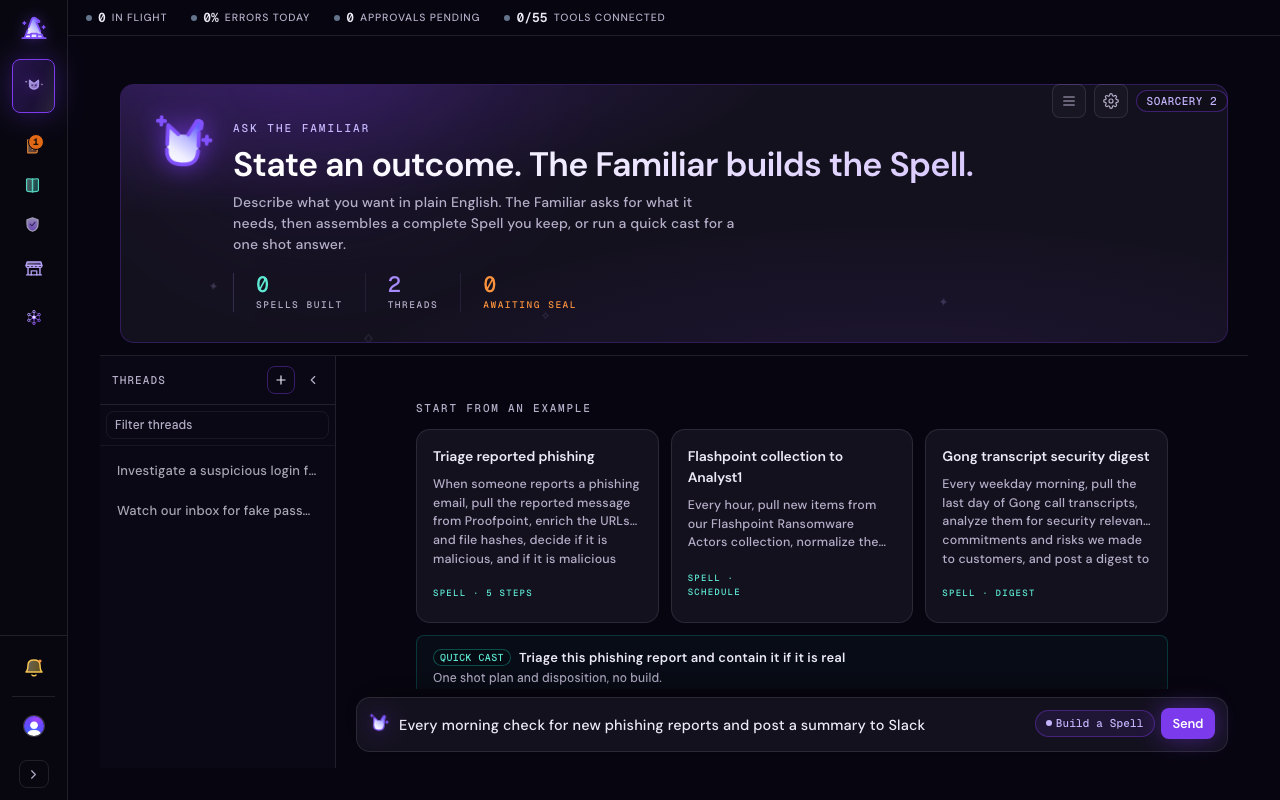
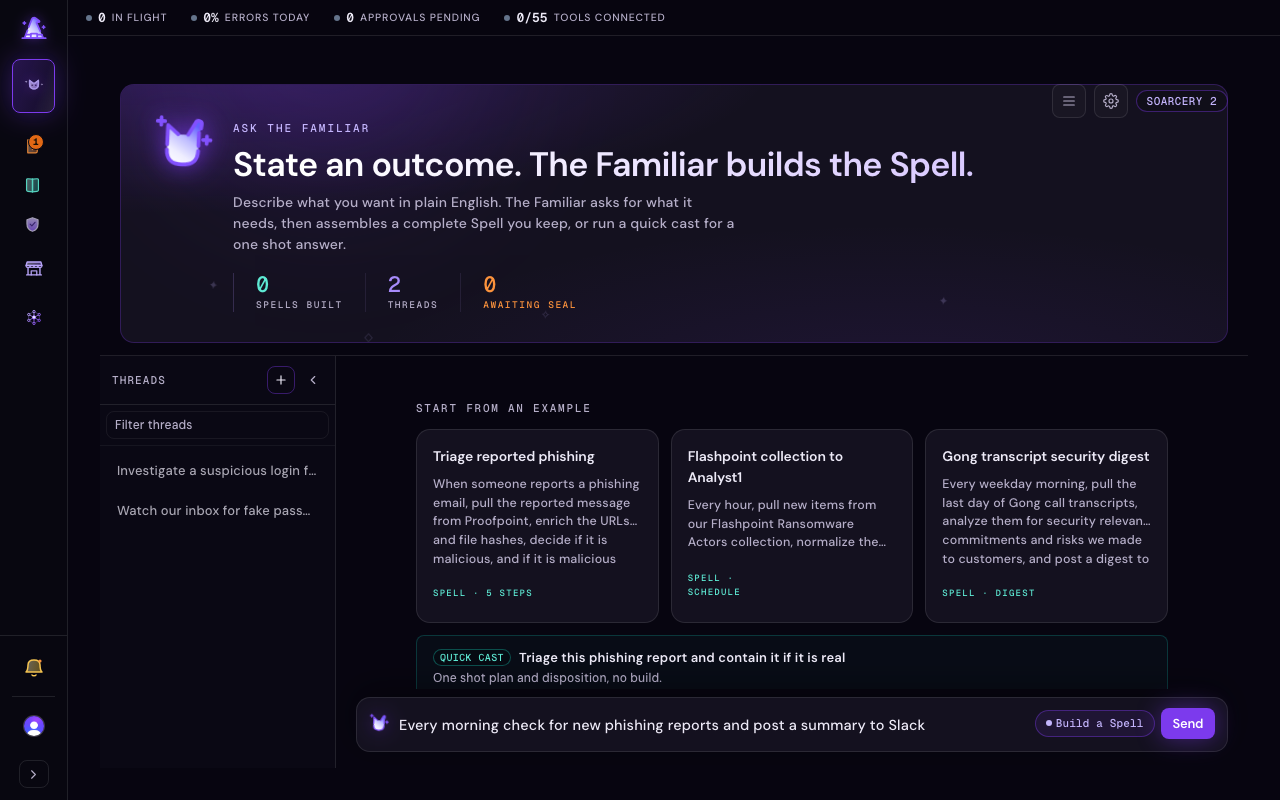
The Familiar (your AI operator companion) is the one place you type in the whole product. You do not pick a mode or a screen first: you describe what you want and the Familiar reads your sentence and does the right thing, showing the call it is about to make on a small chip beside the send control so you can change it with one click. The catalog below groups everything the Familiar can do today by the job you are trying to get done. These are the supported workflows, alongside the hand-built ones you can still drive yourself from the screens.
Say what you want
There are three core things the Familiar does with a sentence, and it infers which one you mean from your phrasing. You never choose up front.
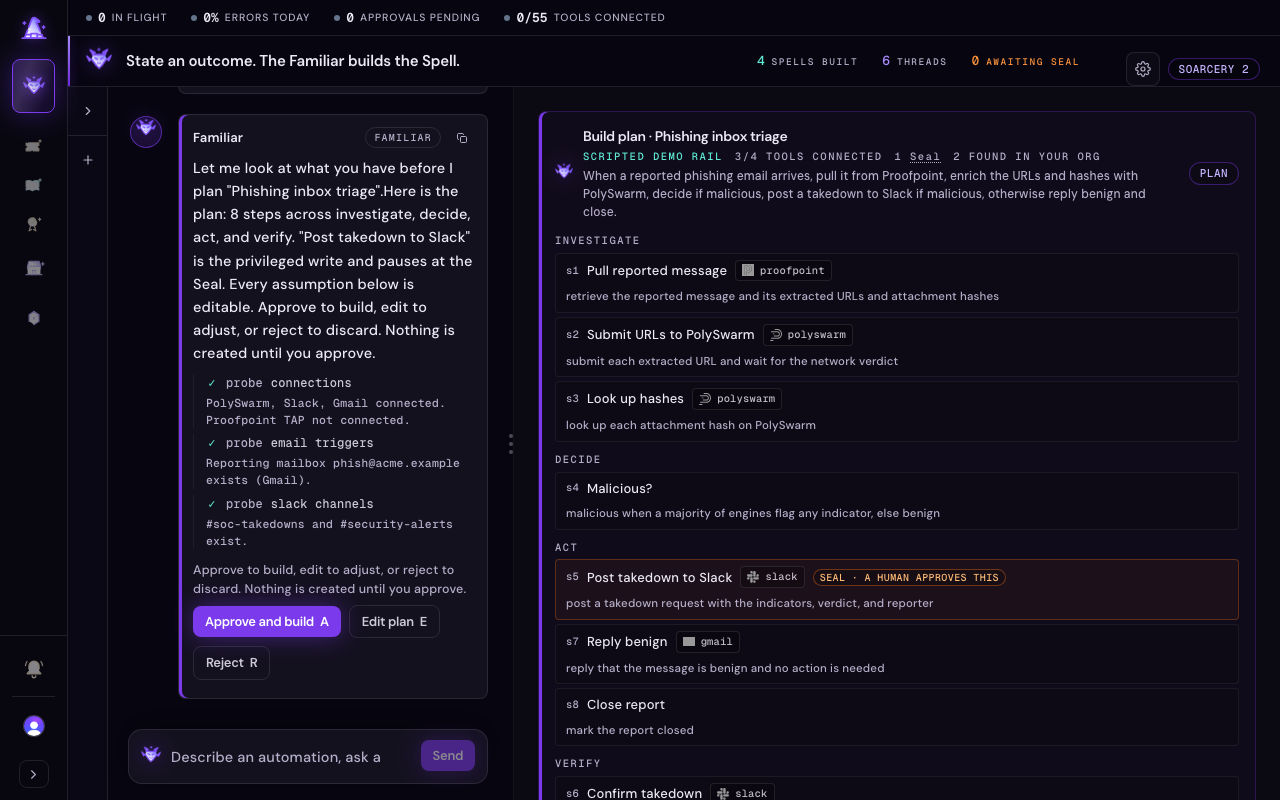
Build a Spell. Say the outcome you want from start to finish, and the Familiar builds a Spell (a saved, reusable automation) for you. It first checks what your organization has, then shows a plan: the steps, the tool each one needs, and every assumption it made. Nothing is created until you approve the plan. What it asks of you: approve, edit, or reject the plan, and connect any tool a step needs that you have not Connected yet. See Build a spell with the Familiar.

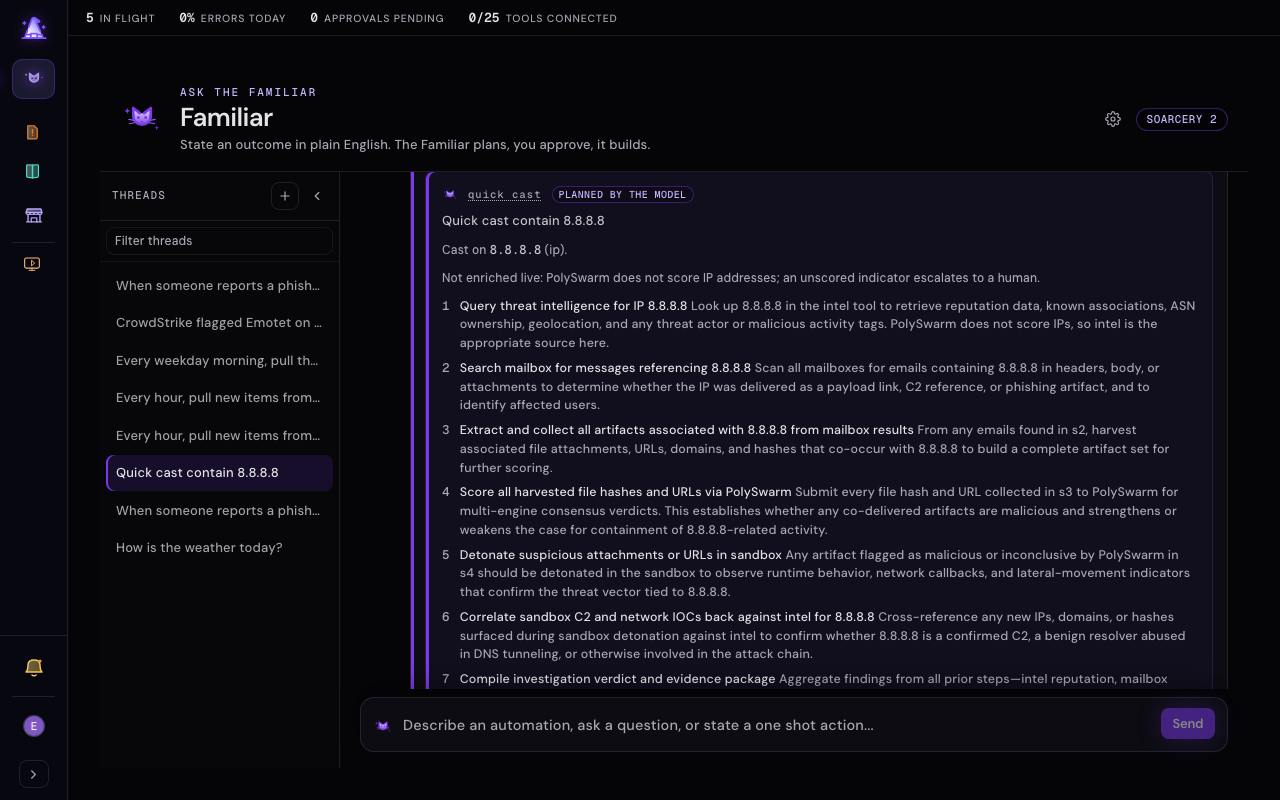
Quick cast a one shot. Hand the Familiar a single indicator (an IP, a URL, a domain, or a file hash) and a single action, like triaging one report or blocking one address. A file hash can be any digest from MD5 through SHA-512, recognized on sight. It runs a cast (a single agent pass through the safety gate): it enriches the indicator and decides a disposition, and the gate, not the model, owns what happens next. An indicator with nothing scored yet gathers more evidence first (a read-only step, never a write), a contested or partly malicious spread escalates to a human instead of closing, and only a clean result with no dissenting engines closes on its own. Any privileged write stops at a Seal (a human approval checkpoint) before it happens. What it asks of you: your yes at the Seal when a step would change a real system. Nothing is saved unless you choose to build the cast into a Spell. See Build a spell with the Familiar.
Ask a question. Ask about your tickets, your coverage, or anything else, in a sentence. The Familiar answers from your own data and shows the tickets, detections, and enrichments it cites inline. Describe what happened and ask what to do, and it answers instead of building. What it asks of you: nothing, until you decide to act on the answer. See Talk to the Familiar.
Work your tickets
A ticket is one investigation with its evidence and audit trail kept together. The Familiar can work one beside you.
Open and work a ticket in the co-work panel. Ask the Familiar to open a ticket (for example "open my most recent phishing ticket" or "pull up my highest severity ticket") and it opens that ticket as a live document on the right while the conversation stays on the left, the same split you get when building a Spell. From there you read the timeline, add notes, and dispose the ticket without leaving the Familiar. What it asks of you: the disposition itself, through the controls in the panel.
Dispose a ticket. The panel carries the same controls as the ticket page: assign it to a teammate, escalate it to a higher tier (which always hands it to a named owner, so an escalation never sits in a queue with nobody on it), close it with an outcome, or reopen it when new evidence lands. Closing runs a completeness check first: a record still missing its evidence or its notes is held back with a plain list of what it needs, and you can mark it resolved instead and finish the record before you close it for good. See Work a ticket.
Tickets flow to your ticketing tool. Connecting a ticketing tool provisions both supported paths, ServiceNow and Jira, so whichever your team runs is ready. When an approved action files a ticket, it lands in that system carrying a link back and the verdict, the score, the indicator, and links to the evidence written into its body, so the other tool has the context without a click back. Your closes and comments flow out to it, and the Familiar can propose (with a Seal for your approval) turning on inbound two-way sync, after which moves and closes made in the other system flow back onto the ticket too, recorded as coming from that system. When one action files tickets across several targets, you get a per-target result, so a partial success is never hidden. Without a Connected ticketing tool, the work still lives in Soarcery; it just does not leave the building. See Connect your tools.
Run your day
Beyond a single ticket, the Familiar runs the day-to-day around the floor.
Get a shift handoff. Ask for the overnight or end-of-shift digest and the Familiar sums up what happened while you were away: what stitched into tickets, what closed on its own, and what is waiting on you.
Ask why something was blocked. When an action did not run, ask the Familiar why and it walks you back through the decision: which rule stopped it, the evidence it rested on, and what would let it through. See the seals queue.
Rehearse a Spell. Ask to rehearse a Spell before you trust it, and it runs in a safe dry mode: you see every step it would take and every Seal it would stop at, without touching a real system. See Spells.
Go somewhere. Tell the Familiar to take you to a screen, like "open the seals queue" or "show me tools", and it navigates there so you do not hunt through the menu yourself.
Set up and administer
The Familiar also handles the setup work that used to mean digging through settings.
Invite a teammate. Ask the Familiar to invite someone by email and it sends the invite, so you can assign them a ticket the moment they are in. If your workspace is at its member limit, the Familiar tells you why the invite could not go out and what to free up, and the members settings show your seat position before you try.
Connect a tool by name or by job. Name the tool ("connect Slack") or name the job ("I need ticketing") and the Familiar finds it. When a job has more than one supported tool, for example ServiceNow or Jira for ticketing, it offers both and helps you connect the one you pick, in the same dialog the Tools page uses. It never enters your credentials for you: you add them yourself on the Tools page. See Connect your tools.
Test whether a tool is working. Ask the Familiar to test or verify a Connected tool ("is Slack working?", "test the Gmail connection") and it runs a live, read-only probe of that connection right then, reporting healthy or degraded with the reason when it is degraded. This is different from asking whether a tool is Connected: that is a configuration answer, while a test proves the connection actually functions this moment. The probe only reads, so it never sends, writes, or changes anything at the far end. Ask about a tool that is not Connected and the Familiar says so and offers to connect it instead of testing nothing. See Connect your tools.
Send yourself a test email. Ask the Familiar to send you a test email and it proves your Gmail connection can send end to end. The email always goes to your own verified address, resolved from your account: the Familiar never takes a recipient from your message, and if you name someone else it tells you a self-test only goes to you. Because sending is an outbound action, this is gated: the Familiar stages the send at a Seal and the email goes out only after you approve it, never on its own. Gmail is the supported tool today; if it is not Connected, the Familiar offers to connect it first. See Connect your tools.
Run a clean demo (demo organizations only). Demo and QA organizations expose presenter controls through the Familiar: switch the canonical walkthrough outcomes onto a scripted rail so a rehearsal runs the same way every time, and reset the demo data to its pristine state between runs. These controls do not appear outside demo and QA organizations. See Build a spell with the Familiar.
When something is missing
A plan tells you what it needs. When a build needs a tool you have not Connected, the plan says so up front, offers the supported alternatives in that category, and the Familiar helps you connect your pick on the Tools page before the build finishes. A tool you leave unconnected is flagged for attention, never treated as an error: the Spell still saves, and you can connect the tool later. See Connect your tools.
Honest limits. The Familiar proposes; it does not execute privileged or irreversible actions on its own. Those pause at a Seal for a human yes, every proposal it makes lands in the Seals queue so nothing acts unseen, and a human always disposes a ticket. Some things the Familiar can send depend on the right tool being Connected: a ticket files into your ticketing system only when one is wired up. This is the guarantee, not a gap: the Familiar cannot act outside the rules that govern it.