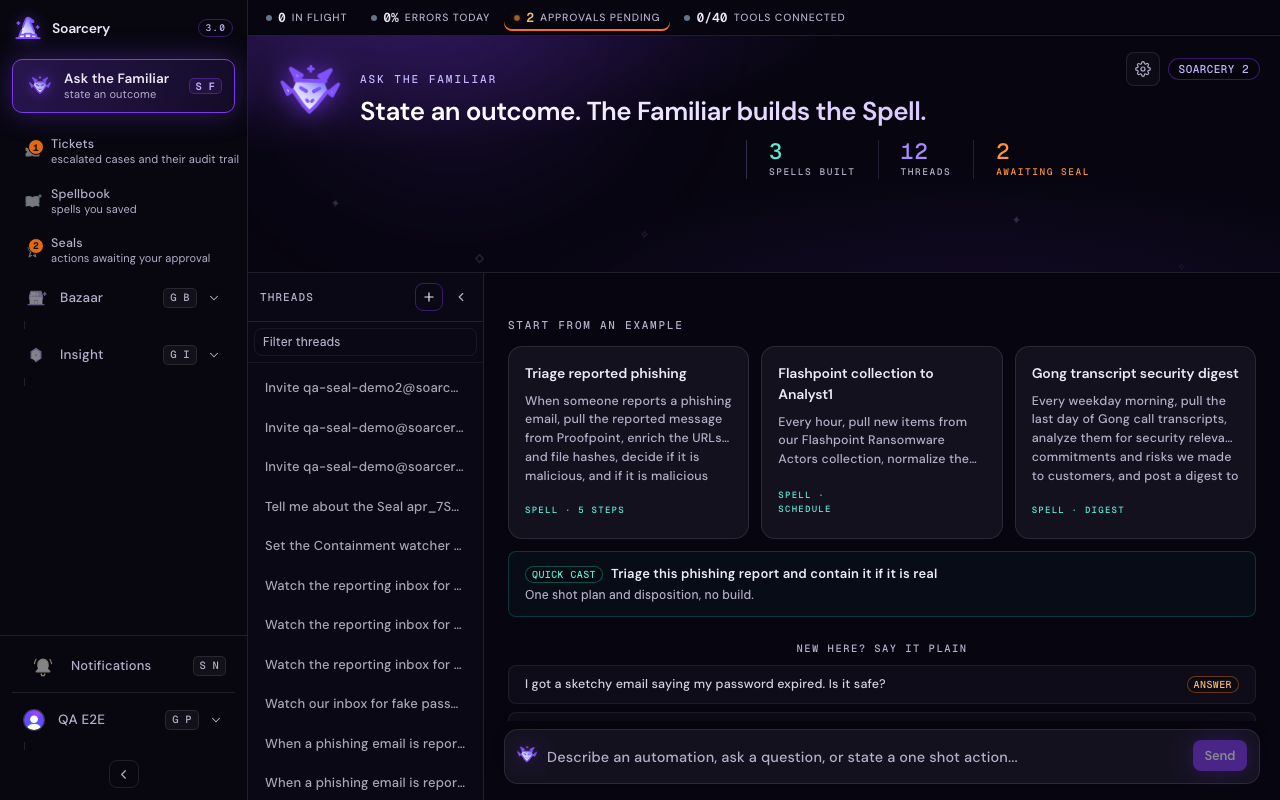
The Familiar is the AI assistant you talk to in plain English. Instead of clicking through screens, you type what you want and it does the work: look something up, open a ticket, or build a whole automation. It still asks you before doing anything risky.
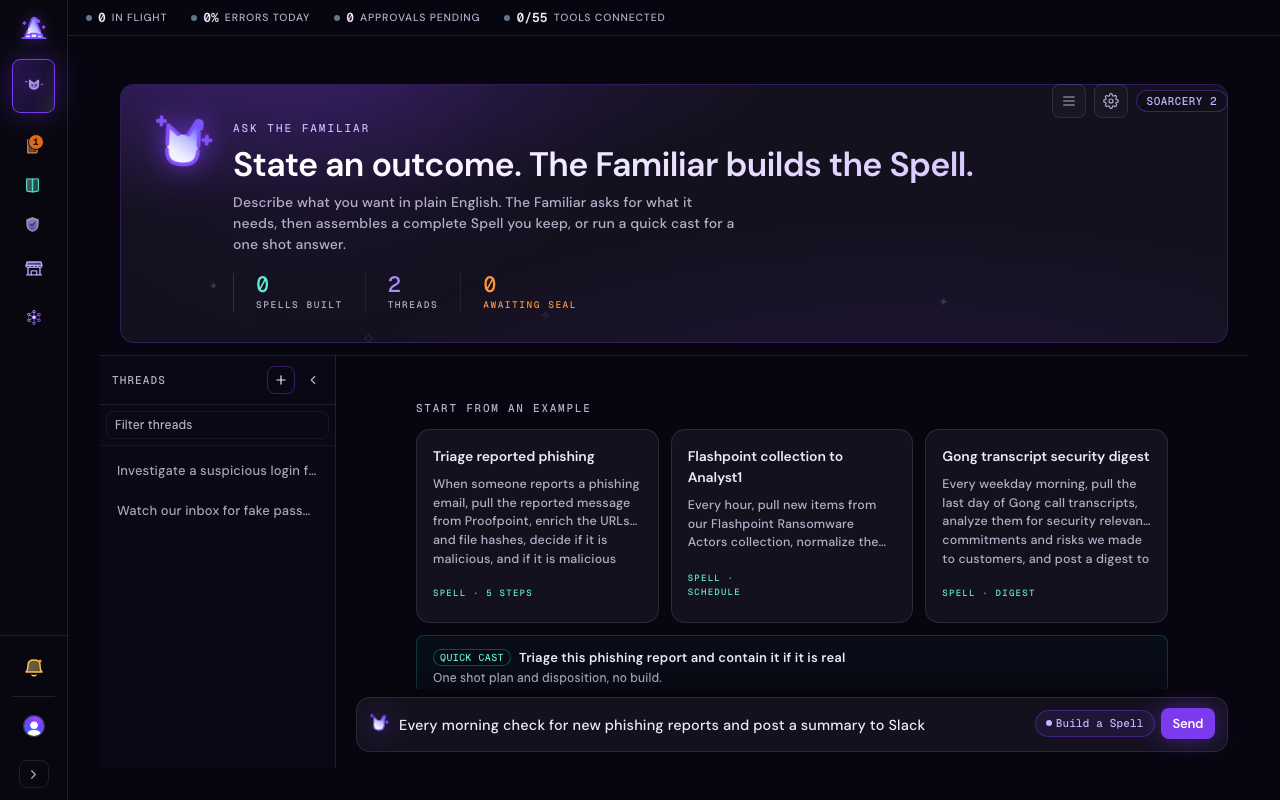
The Familiar (your AI operator companion) is the cornerstone of Soarcery and the one conversational surface in the product. Instead of navigating screens to trigger actions, you describe what you want and the Familiar does the work: looks up an indicator, opens a ticket, triages a fresh detection, or assembles a whole response automation. It is not a search box; it is an operator that can reach every tool and surface, held to the same gate that pauses any privileged action for a human. There is no separate chat wizard and no floating button to summon: you go to the Familiar and start typing.
Threads that persist
Every conversation is a thread, and the active thread rides in the address bar, so a link to what you are looking at is just the URL. Threads keep their context: when you say "show me the high-severity ones" the Familiar knows what you were looking at before. Start a new thread when you switch topics and keep the same one for a continuing investigation. An unsent draft survives a reload, so a half-typed question is still there when you come back. Right-click any thread in the rail to rename or delete it, and open a fresh one from the new-thread control at the top of the list. Sharing a thread hands it to your teammates: the share target defaults to your organization, so a link you paste is one your team can already open.
Ask, cast, or build
Three things you can do: ask a question, quick cast (triage one indicator in a hurry), or build a reusable Spell. You do not choose which; the Familiar reads your sentence and picks.
Everything you ask the Familiar to do is a turn in a thread, and you never pick a mode first: the composer reads what you type and infers the intent, showing its call on a small chip beside the send control. One click on the chip changes the call before you send. A question gets a direct answer drawn from your own data, with the tickets, detections, and enrichments it cites rendered inline. A quick cast is a one-shot triage: hand it an indicator (an IP, URL, domain, or file hash, any digest from MD5 through SHA-512, recognized on sight) in a sentence and it enriches, decides a disposition, and stops at a Seal if the action is irreversible. A build is the bigger move: state an outcome and the Familiar plans and assembles a full Spell (a saved, runnable response automation) in front of you. A cast you want to keep can be promoted into a build in one step. See Build a spell with the Familiar for the plan-first flow casts and builds share.

Document mode
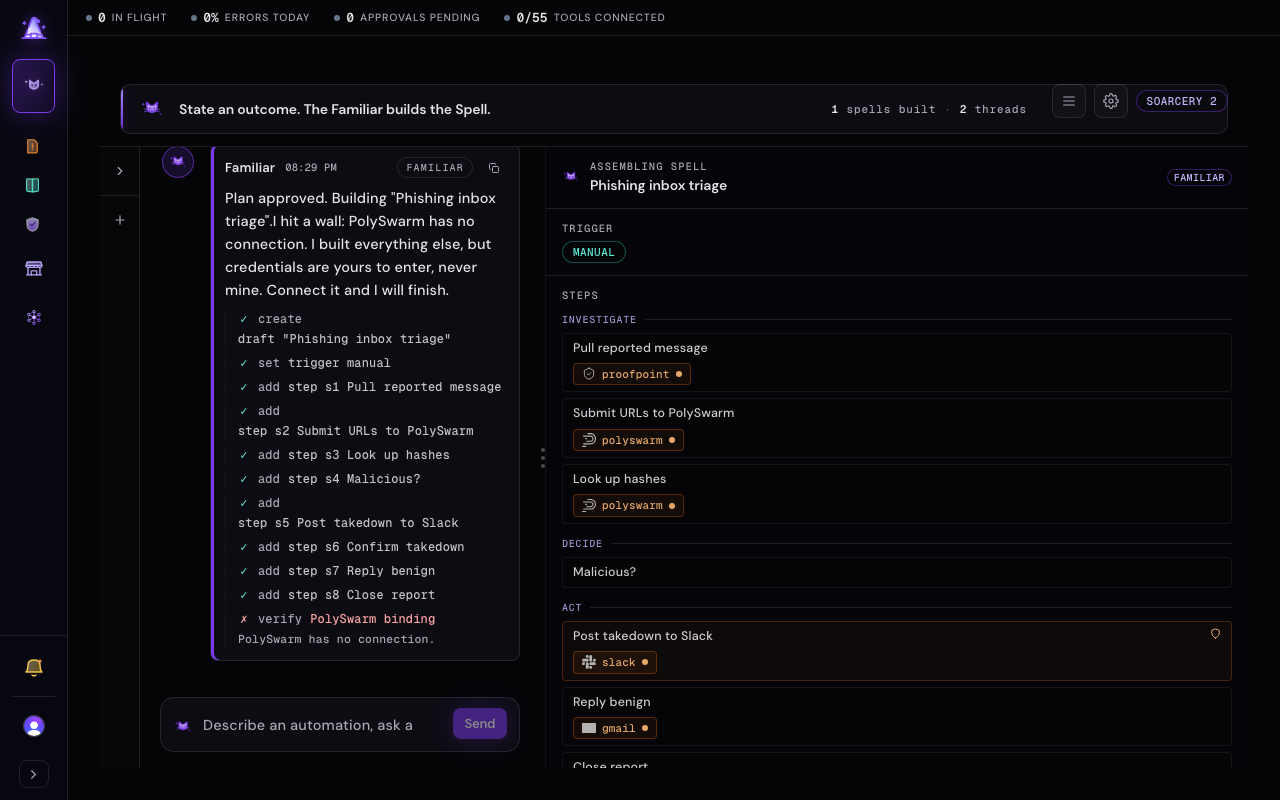
As soon as a plan or a draft Spell exists, the surface splits: the conversation stays on the left and the plan, or the assembling Spell, renders as a live document on the right. The thread rail slides away to give the document room. It is not gone: reopen it whenever you want, and its collapsed or expanded state is remembered. The document updates as the Familiar works, so you read the automation taking shape while you keep talking to it. A build runs as a background job with its progress shown step by step, so a long assembly never times out the way a single long request once did, and if a step fails you can retry it in place without losing what you wrote.
Work a ticket together
Say "open my most recent phishing ticket" and the ticket opens beside the chat, with the controls to assign, escalate, close, or reopen it right there. Three clicks at most: you type, it opens, you dispose.
The same split that shows a Spell being built also opens an existing ticket as the document on the right, so you can work it without leaving the conversation. Ask for one by what you remember: a topic word ("open my phishing ticket"), your own queue ("prioritize my ticket work today"), or urgency ("open my highest severity ticket and let us work on it"). The Familiar finds the match and opens it; if nothing matches it says so and offers the nearest tickets to pick from. Only your own tickets surface when you ask for yours, and only one ticket is open at a time.
The open ticket shows its severity, status, escalation tier, and who it is assigned to, then the same disposition controls that live on the full ticket page. Assign it, escalate it to another analyst, reopen it, or close it with an outcome, all from the panel. Closing still runs the readiness check, so a ticket that is not ready to close explains what is missing and offers to mark it resolved instead. Risky response actions (isolating a host, blocking an address) still route through the safety gate and pause at a Seal: the disposition bar changes the ticket, never the world outside it. When you want the full dossier or the artifact graph, "Open full ticket" takes you to the ticket page in one click.
The one law still holds
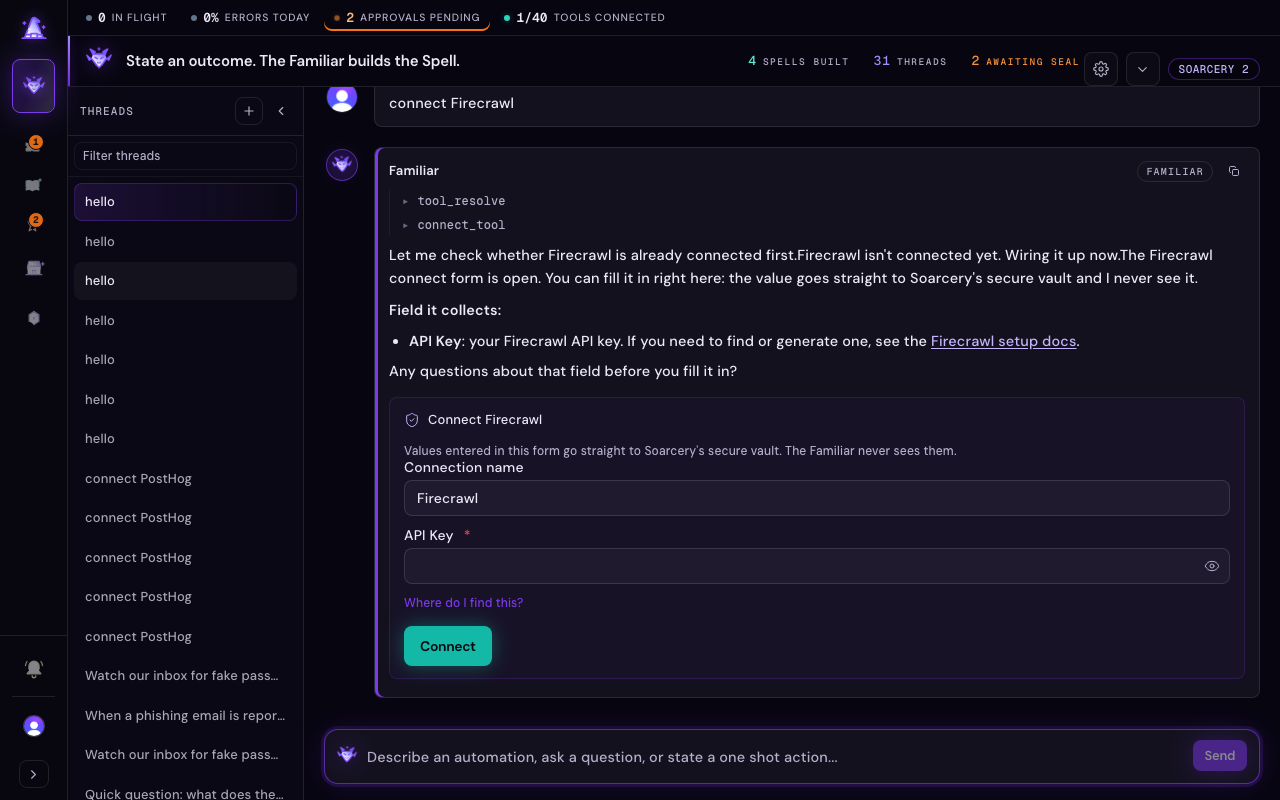
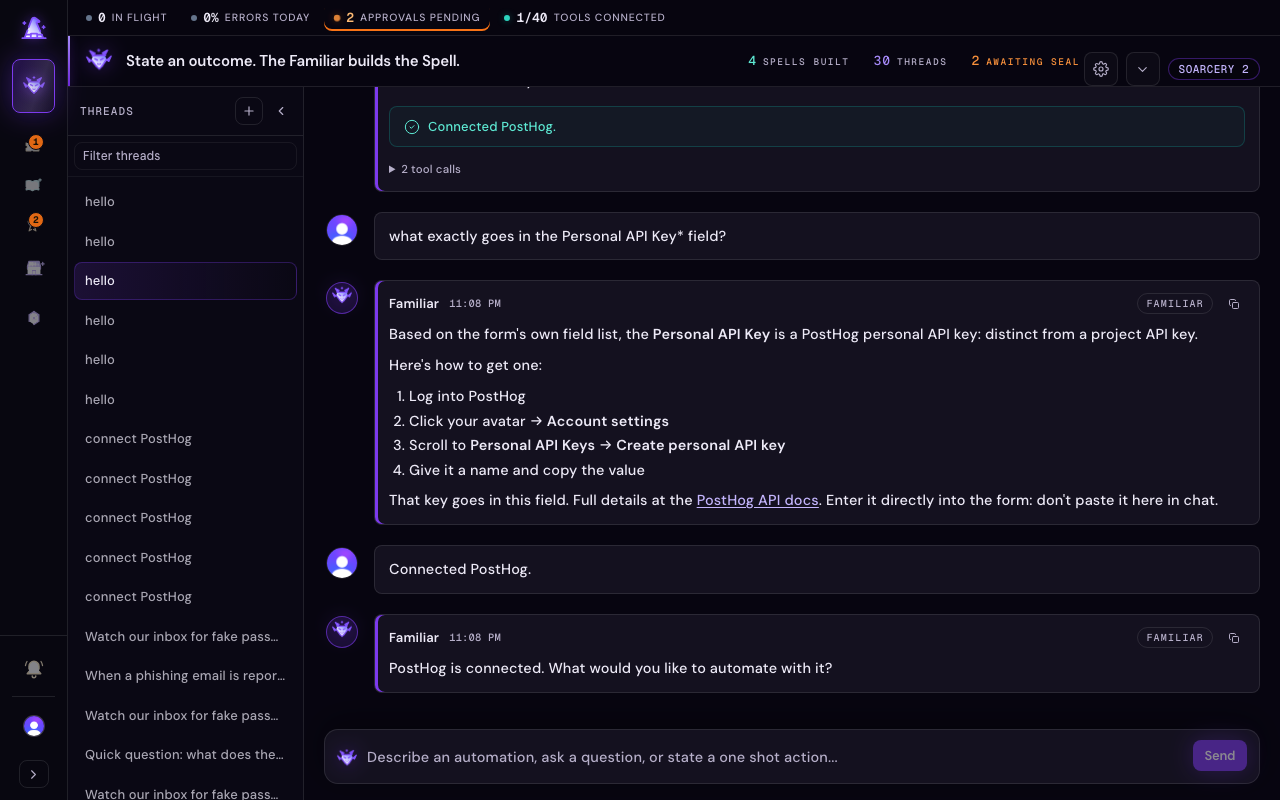
The Familiar proposes rather than executes when an action is privileged or irreversible. Ask it to isolate a host and you get a proposal that lands at a Seal (a human approval) for your decision, never a direct write, and every proposal it makes lands in the same Seals queue so nothing acts unseen. It also never handles credentials: when a build needs a tool that is not connected, the Familiar opens a connect form right there in the conversation instead of sending you off to another screen. Each field is masked as you type and carries its own link for where to find that value in the outside service, and a plain note explains that what you enter goes straight into Soarcery's secure vault, never through the Familiar itself. Ask about any field and the Familiar explains it before you fill it in. Connecting tests the credential against the live service before anything is saved, so a bad value is caught on the spot, with any problem shown right where you are fixing it. You can also leave a tool unconnected and flag it as a blocker to come back to later; either way the build keeps moving. This is not a limitation; it is the guarantee that the Familiar cannot act outside the rules that govern it, credentials included.