Tools are the outside services Soarcery connects to, one per service you use, like chat, your log platform, or your endpoint protection. The AI reaches the real world only through Connected tools, so start here: everything else assumes your tools are wired up and healthy.
Tools are what your automation wields: one tool per third-party service you run, whether chat, a log platform (SIEM), endpoint protection (EDR), identity, threat intel, or ticketing. The AI reaches the outside world through your tools, and the signals that start the loop arrive through them too. A tool you have wired up with working credentials is Connected; everything else in the product assumes Connected, healthy tools, which makes this the first guide worth finishing end to end.
A connected ticketing tool is two-way. When an approved action files a ticket, the case carries the real ticket id and a link back to it, and analyst notes flow out to the ticket. The ticket itself is built from the investigation, not the raw request: its summary and body carry the verdict, the engine score, the indicator, and links to the evidence, so whoever picks it up in the other system sees why it was raised. When an action names more than one ticketing tool, each one reports back on its own: filed, failed, or skipped because it is not connected, so nothing is dropped in silence. Set the ticketing connection to accept inbound changes and the flow reverses too: when someone moves or closes the ticket in the other system, the case follows, with the change recorded as coming from that system. A connection set to send only keeps those inbound updates as advisory notes instead. Where a service also offers a separate read-only lookup tool, keep its credential browse-only and leave the writing to the ticketing connection: one writer per external system.
Add a tool
Pick the tool in the catalog and add it with its credentials. Each field carries its own help, so you know what the service expects and where to find it. Before anything is saved the connection is tested against the live service, so you learn a credential is wrong at connect time, not the first time a spell reaches for it. Tools belong to your organization by default, not to you personally, so a spell another analyst wrote can use the tool you configured. Where a tool offers scoped credentials, grant the narrowest scope that works: the AI proposes actions, it does not need the keys to the kingdom. The catalog also lists tools that are newer or not yet available, each marked with its status: see Tool statuses for what active, beta, and coming soon mean.
Connect ServiceNow or Jira and Soarcery provisions built-in ticketing for it at the same time, so escalations can file and sync without extra setup. Turning on inbound two-way sync is itself a change to a privileged system, so the Familiar can propose it and it waits at a Seal for a human yes before it takes effect.
When the Familiar is assembling a Spell and reaches a tool you have not connected yet, it opens this same connect step for you without leaving the conversation: the same masked fields, the same per-field help, and the same live credential test happen right there in the chat, and the Familiar can walk you through any field on request. Nothing about the catalog changes, and this page is still here whenever you want to set a tool up ahead of a build, or connect one the Familiar has not asked for yet.
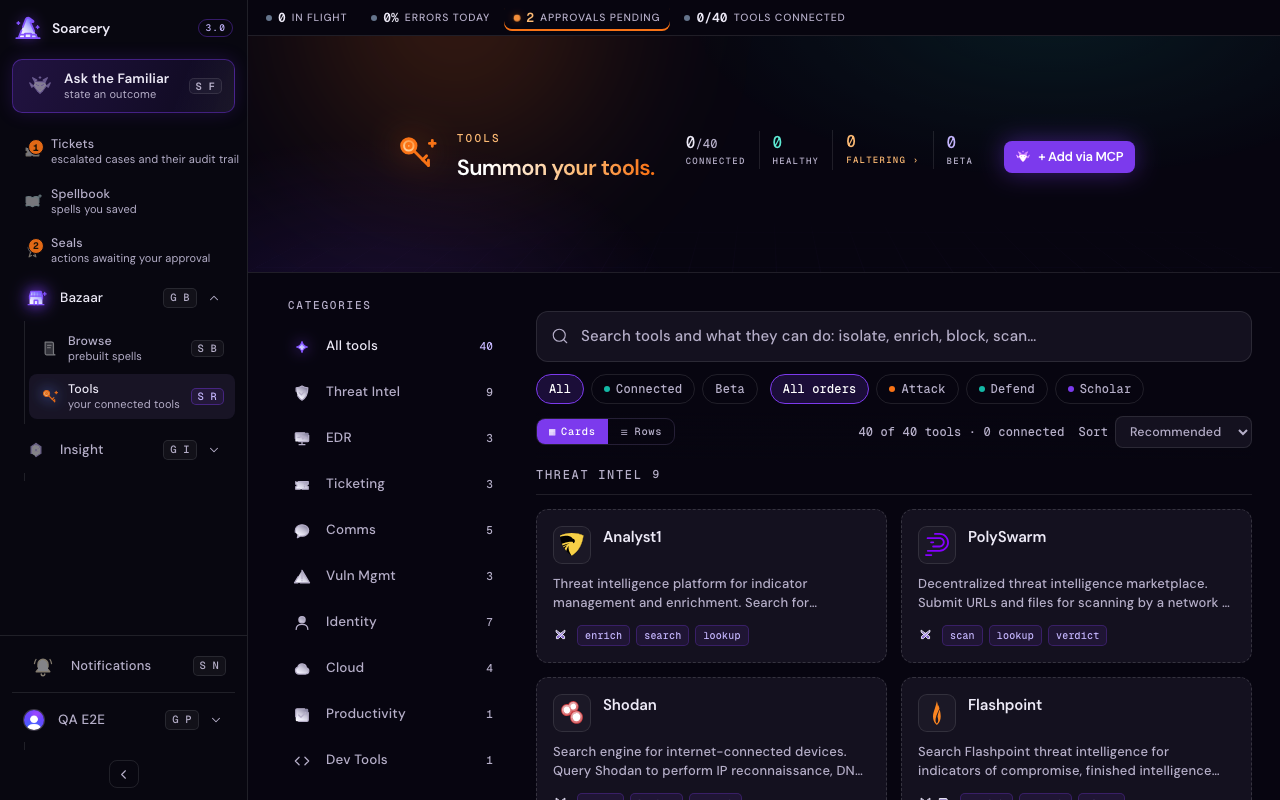
Health, and testing it
Tools are health-checked automatically on a regular cadence, and you can test them all on demand from the catalog. A Connected tool that starts failing its check is surfaced on the tool and on anything that depends on it, so you see the break before it bites. When a spell misbehaves, check tool health before you debug the spell: it is the usual suspect.
You can also just ask the Familiar whether a tool is working. Asking it to test or verify a Connected tool runs a live, read-only probe of that connection right then and reports back healthy or degraded, with the reason when it is degraded. The probe only reads: it reaches the service to confirm the credentials still work and never sends, writes, or changes anything. If you ask about a tool that is not Connected, the Familiar says so plainly and offers to connect it rather than pretending to test nothing.
Bring your own via MCP
If your tool is not in the catalog, point Soarcery at your own MCP server (Model Context Protocol, the open standard for exposing tools to agents). The capabilities your server advertises become available to spells and the Familiar like any first-party tool.
Every call is logged
Each call a spell or the AI makes through a tool lands in the usage log, attributable to the run that made it. When an auditor asks what touched the EDR last Tuesday, the answer is a query, not an archaeology dig. See Usage for where the volume and spend show up.